Definition of vehicles
An XML block with tag name <vehicle:class> can be provided for each
vehicle class, then each <vehicle> will instantiate a vehicle or robot
of a particular class.
Inside <vehicle:class> tag, there are tags <dynamics>, <friction> and instances of <sensor>.
Note
See predefined vehicles types for XML code examples: Vehicles.
Vehicle kinematic and dynamics
There are five vehicle dynamics models. See vehicle_models for details.
<dynamics> with attribute class specifies which model to use. Currently available classes:
differential— 2-wheel differential drivedifferential_3_wheels— 3-wheel differential (e.g. with a rear caster)differential_4_wheels— 4-wheel skid-steer differentialackermann— front-axle steered, simplified torque modelackermann_drivetrain— front-axle steered with explicit drivetrain
Each class has specific inner tags for its own configuration.
Common
Every dynamics has wheels specified with tags <i_wheel> where i stand for wheel position index (r, l for differential drive and fr, fl, rl, rr for Ackermann-drive)
Wheel tags have following attributes:
pos - two floats representing x an y coordinate of the wheel in local frame
mass - float value for mass of the wheel
width - float value representing wheel width [fig:wheel_forces]
diameter - float value to represent wheel diameter [fig:wheel_forces]
Ackermann models also use <max_steer_ang_deg> to specify maximum steering angle.
<chassis> is also common for all dynamics, it has attributes:
mass - mass of chassis
zmin - distance from bottom of the robot to ground
zmax - distance from top of the robot to ground
Motion controllers
Each dynamics class has one or more controllers. The available controller
class names are:
raw— control raw wheel torques directly (available for all dynamics)twist_pid— [differential only] control with(v, omega)twist messages via PIDtwist_ideal— [differential only] ideal twist tracking (no PID, instantaneous)twist_front_steer_pid— [Ackermann / Ackermann-drivetrain] control with(v, steer_angle)via PIDfront_steer_pid— [Ackermann / Ackermann-drivetrain] control with PID for velocity and raw steering angles
Controllers with pid in their names use a PID regulator that needs to be configured with tags <KP>, <KI>, <KD>, and <max_torque>.
Twist controllers need initial <V> and <W> for linear and angular velocities respectively.
Steer controllers need initial <V> and <STEER_ANG> for linear velocity and steering angle respectively.
Tip
Use the raw controller with zero torques to create a passive,
unpowered body (e.g. a trailer pulled through a joint).
Ackermann-drivetrain model
needs a differential type and split to be configured. For this purpose there is a tag <drivetrain> with argument type. Supported types are defined in [sec:ackermann_drivetrain]. In XML their names are:
open_front
open_rear
open_4wd
torsen_front
torsen_rear
torsen_4wd
<drivetrain> has inner tags describing its internal structure:
<front_rear_split>
<front_rear_bias>
<front_left_right_split>
<front_left_right_bias>
<rear_left_right_split>
<rear_left_right_bias>
which are pretty self-explanatory.
Friction
Friction models are described below and defined outside of <dynamics>. The tag for friction is <friction> with attribute class.
Class names in XML are:
wardiagnemma
default
Default friction uses subtags:
<mu> - the friction coefficient
<C_damping> - damping coefficient
In addition to default, Ward-Iagnemma friction includes subtags:
A_roll
R1
R2
that are described in the Ward-Iagnemma friction model documentation.
Vehicle instances
For each vehicle class, an arbitrary number of vehicle instances can be created in a given world.
Vehicle instances are defined with the <vehicle> tag that has attributes name and class. class must match one of the classes defined earlier with <vehicle:class> tag.
Subtags are:
<init_pose> - in global coordinates: \(x\), \(y\), \(\gamma\) (deg)
<init_vel> - in local coordinates: \(v_x\),\(v_y\), \(\omega\) (deg/s)
Logging
Each vehicle is equipped with a high-rate logger, capable of streaming to CSV files the internal variables of each vehicle and wheel, separately, for posterior analysis.
It can be started or stopped by pressing the key ‘L’ after getting the focus to the MVSim GUI window, as can be seen in the control UI instructions:
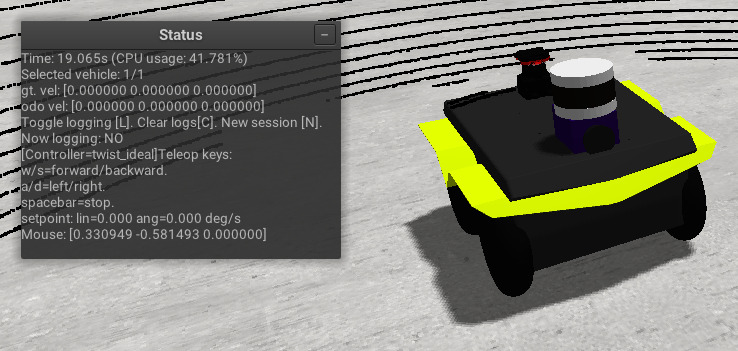
Each “logging session” will be dumped into a separate CSV file for convenience of posterior analysis. The header of the CSV includes the variable names for each column: vehicle position and orientation, wheel angular velocity and acceleration, lateral and longitudinal forces, etc.
If you want to add new variables to this logger, look for logger->updateColumn(...) in the code
for usage examples.
ROS 2 Integration
When running MVSim with the ROS 2 node, vehicles automatically publish their state and sensor data to ROS 2 topics. See Vehicles section 10 for complete topic listings.
Published Topics
Core topics (always published):
<VEH>/odom— Odometry with realistic noise<VEH>/base_pose_ground_truth— Perfect ground truth for evaluation<VEH>/collision— Collision detection status<VEH>/tf— Transform tree for the vehicle
Sensor topics are published dynamically as observations are generated. Topic names are derived from the sensor’s name attribute in the XML definition.
Subscribed Topics
<VEH>/cmd_vel— Velocity commands (geometry_msgs/Twist)
The vehicle processes these commands through its configured controller (see Motion controllers section). Commands are valid for 1 second, after which the vehicle stops for safety.
ROS 2 Launch Parameters
Key parameters when launching the mvsim_node:
realtime_factor— Simulation speed multiplier (default: 1.0)headless— Run without GUI (default: false)period_ms_publish_tf— Transform publication rate in milliseconds (default: 20)do_fake_localization— Enable fake AMCL output (default: false)publish_tf_odom2baselink— Publish odom→base_link transform (default: true)publisher_history_len— Queue size for publishers (default: 10)
Example launch:
ros2 launch mvsim demo_warehouse.launch.py realtime_factor:=1.0 headless:=false